
Glitched Legends Battle Finn
PhamphamMusic
4.5100.00 Reviews
- Version
- 1.6
- Installs
- 500.00K
- Age Rating
- Teen
Screenshots
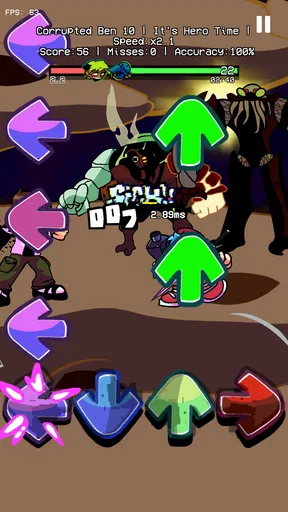
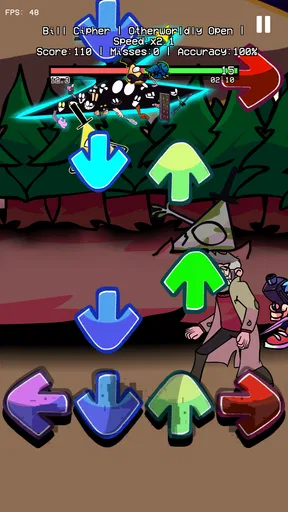
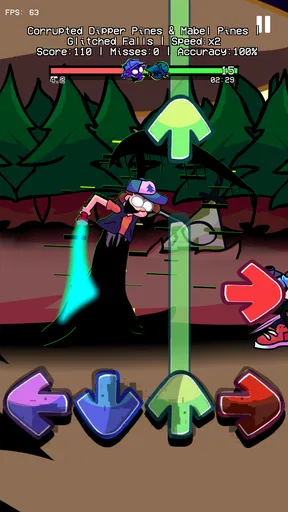
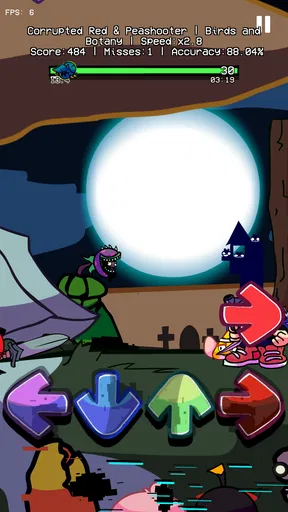
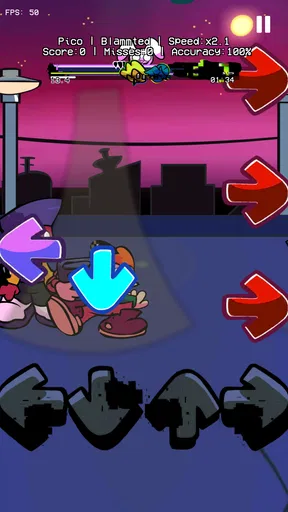
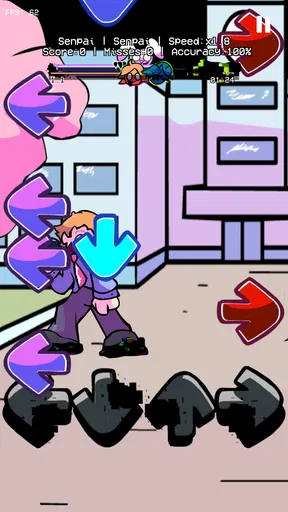
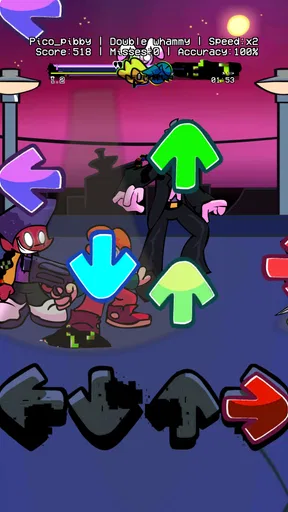
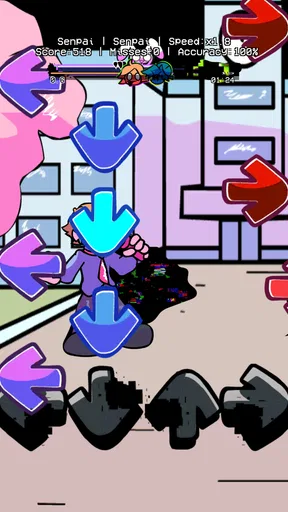
Our Review of Glitched Legends Battle Finn
 Analysis by Appyee
I went into Glitched Legends Battle Finn expecting a small music game with a strong visual hook, and that is the right way to approach it. This is not a broad rhythm platform with a huge menu of modes; it is a focused game built around helping Finn through a strange, corrupted world. The premise is simple, but the presentation gives each session a distinct mood, especially when the screen becomes busy and the music, movement, and visual glitches begin competing for attention.
Phampham’s game is free, aimed at Teen players, and sits in the music category rather than trying to disguise itself as a conventional action title. It has reached over 500 thousand installs and holds a 4.5 average from around 5.5 thousand ratings, which suggests that its unusual combination of rhythm-focused play and adventure-style presentation has found a real audience. I can see why: it is easy to understand at a glance, yet it has enough atmosphere to feel different from a standard tap-along game.
Getting started without turning the first session into a problem
The first useful thing to know is that the game’s appeal depends heavily on your willingness to learn its rhythm and visual language. I would not treat the opening session as a final test of the game. The corrupted setting can make the action look more complicated than it really is, and a player who expects a calm, clearly separated music interface may initially feel that the screen is asking for too much attention at once.
My advice is to begin with the sound at a comfortable level and keep the device steady. That sounds obvious, but timing games become frustrating when the phone is being held at an awkward angle or when outside noise makes the musical cues difficult to follow. A short first session is more useful than immediately trying to push through every challenge. You are learning where to look, when to react, and how the game connects its musical timing with Finn’s progress.
There is also a practical distinction between installing the game and being ready to play it well. The current version is 1.6, and it supports devices running Android 7.0 or later. That makes it accessible to many older Android phones, but minimum compatibility is not the same as a perfect experience on every device. A phone that technically meets the requirement may still feel less comfortable if it has a small display, inconsistent touch response, or limited free space.
The best setup is the one that removes distractions before the first serious attempt. Close unrelated apps if your phone often slows down during games, charge the device if you are planning a longer session, and avoid playing while notifications are constantly appearing. These steps do not change the game itself, but they make it much easier to tell whether a missed action came from your timing or from the device interrupting you.
Where players are most likely to get stuck
The first sticking point is usually not a difficult rule; it is the gap between seeing an event and reacting to it. In a music game, even a small delay in attention can feel like a failure of the controls. When the world is visually corrupted, I found it more helpful to identify one reliable cue and follow it than to stare at every animated detail. Trying to process the entire screen at once is a quick route to late reactions.
A second problem appears when a player treats every attempt as a score attack. That approach can work in a familiar rhythm game, but it is less useful while learning a new one. I prefer to use the first attempts to map the flow: notice the pace, observe where the action becomes denser, and accept that a rough run can still teach you something. Once the pattern feels familiar, accuracy becomes easier to improve.
The game’s unusual tone can also create an expectation mismatch. Someone looking for a pure music-training tool may find the corrupted adventure presentation distracting, while someone seeking a long, story-heavy quest may find the rhythm focus too narrow. The title is strongest in the middle: it gives music-game players a world to move through and gives adventure-minded players a different way to interact with that world.
If progress seems to stop, I would first check whether the issue is actually a misunderstanding of the current task. Revisit the visible objective, slow down your inputs, and try again without changing several things at once. Changing the device, reinstalling immediately, and altering every setting together makes it difficult to identify what helped. A controlled retry is usually more informative.
Simple checks before blaming the installation
Before deciding that the game is broken, I would run through a few basic checks. Confirm that the installation finished normally, make sure the phone has enough working space for ordinary operation, and restart the app after closing it completely. If the device has been running for a long time, a full restart can also clear temporary slowdowns that appear only during play.
It is worth checking the operating system as well. Android 7.0 is the stated minimum, so a compatible phone should be able to install the game, but older hardware can still behave differently from newer hardware. If the game opens but feels uneven, compare that behavior with another demanding app on the same phone. If several apps are stuttering, the wider device environment is a more likely explanation than this particular game.
Audio deserves special attention. Music games are unusually sensitive to muted media volume, connected wireless accessories, and interruptions from other audio apps. If the visuals seem responsive but the timing feels wrong, test the game with the phone’s own speaker before drawing conclusions about the controls. A wireless connection can introduce enough delay to make a familiar sequence feel inconsistent, even when the game is receiving inputs correctly.
I would also avoid changing multiple sound and display conditions between attempts. Try one session with headphones disconnected, then one with them connected, and compare how the timing feels. This is a practical way to separate a genuine gameplay problem from an audio-path problem. It is especially useful if the game feels fine when viewed silently but becomes difficult when you rely on musical cues.
Recovering a session when something goes wrong
When a run goes badly, I find a staged recovery more useful than immediately removing and reinstalling the game. First, leave the current session and reopen it. If the same behavior remains, restart the phone and try again under the same conditions. Only after those simple steps would I consider reinstalling, because an early reinstall can erase useful context and may not solve a problem caused by the device, sound output, or interrupted operation.
For a timing issue, recovery should begin with the least invasive change. Keep the same level or sequence, use the built-in phone speaker, and focus on a single cue. If that improves the result, the likely trouble was not the basic idea of the game but the way the session was being presented. If it does not improve, test a different session to see whether the problem follows the entire game or only one particular moment.
For a visual slowdown, remove background pressure from the phone. Close other apps, stop downloads temporarily, and give the device a moment to cool if it feels warm. I would not interpret one rough session as proof that the game is incompatible. A short repeat after the phone has settled tells you much more than an immediate series of frustrated attempts.
One useful habit is to separate progress recovery from performance testing. If you are trying to reach a difficult part, play normally and concentrate on the music. If you are diagnosing a technical issue, repeat the same conditions and observe whether the delay, sound problem, or visual interruption appears again. Mixing these goals makes every failure feel personal, while separating them turns the problem into something you can actually investigate.
There is a trade-off here. A clean reinstall may be appropriate after a persistent installation problem, but it is a poor first response to ordinary missed notes or an isolated freeze. Those symptoms can come from temporary device conditions. I would protect any progress that matters to me before taking a destructive step and would only reinstall when the simpler checks have failed.
When the game is probably not the cause
Some frustrations are easy to attribute to the title because they happen while it is open. A phone with aggressive background management, unstable audio, a crowded storage area, or a damaged touch surface can make a rhythm game feel far worse than a slower-paced app. The faster and more precise the interaction, the more clearly those device weaknesses appear.
Touchscreen condition is an overlooked example. If taps near one edge regularly fail in other apps, the same area will not become reliable here. Try a basic touch interaction elsewhere on the phone before deciding that the game’s response is inconsistent. Likewise, if the device registers touches correctly but your wireless audio is late, changing the headphones or using the speaker is a better test than repeatedly restarting the game.
Notifications can create another false diagnosis. A banner, call, or system prompt can interrupt concentration at exactly the wrong moment. If failures occur mainly when the phone is receiving alerts, enable a quiet period for play and compare the result. This is not a special game setting; it is simply a way to create a stable environment for a title where timing matters.
Network conditions should also be considered carefully, but I would not assume every pause is an internet problem. If the game behaves normally in other situations and only struggles during a particular device activity, look at the phone’s workload first. Conversely, if a screen never finishes loading or an online-dependent action repeatedly fails, check the connection before changing gameplay habits. The important point is to test one likely cause at a time rather than guessing.
The Teen content rating is another reason I would choose the game with the right audience in mind. The corrupted-world presentation may be a good fit for older children and adults who enjoy darker, stranger game atmospheres, but it is not the first music game I would hand to a young child looking for bright, uncomplicated play. Parents should consider the tone as well as the mechanics when deciding whether it suits a particular player.
How it compares with more familiar music games
Compared with a conventional rhythm app built around clean lanes, simple song selection, and immediate score feedback, this game has more personality in its setting. The musical interaction does not feel detached from the world; Finn’s journey gives the player a reason to care about what happens beyond the next successful input. That makes it a better choice for someone who wants atmosphere and a sense of movement rather than a purely technical practice tool.
The reverse is also true. If your main goal is to train precise timing with minimal visual noise, a simpler rhythm game may be more suitable. A stripped-down interface lets you concentrate on beats, patterns, and score improvement. Here, the corrupted presentation is part of the identity, so players who dislike busy or unusual visuals may spend more energy filtering the style than enjoying the music.
It also differs from a traditional platform adventure. You should not approach it expecting free exploration, a large role-playing system, or a long list of conventional combat options. Its attraction comes from combining a recognizable journey with music-led interaction. That focused design can feel refreshing during short breaks, but it may seem limited to players who need constant mechanical variety.
For everyday use, I see it working best as a short-session game. Imagine waiting for an appointment with ten minutes available: you can open it, settle into the rhythm, attempt a section, and stop without needing to build a large strategy around the session. On a longer trip, it can still work, but I would bring headphones only if their timing feels dependable and would avoid relying on it as the sole source of entertainment for hours.
Small habits that make the experience easier
My first practical tip is to learn with your eyes before chasing performance. Watch how the game presents a sequence, identify the moment that usually catches you, and then repeat that section with deliberate attention. This is more effective than tapping faster. In a music game, frantic input often hides the real mistake: reacting to the wrong cue or losing the beat after a visual change.
My second tip is to keep the physical setup consistent. Use the same grip, screen angle, and audio source while learning. When those variables change constantly, you cannot tell whether improvement comes from understanding the game or simply holding the phone differently. Once a section feels comfortable, then experiment with headphones, a different grip, or a quieter environment.
My third tip is to treat sound as a diagnostic tool, not just decoration. If you suddenly perform worse, ask whether the musical cue is reaching you clearly. Test the speaker, check media volume, and pause any other audio activity. This simple workflow can save a great deal of time because a player may otherwise spend several attempts trying to correct timing that is being distorted outside the game.
A fourth useful approach is to stop after a frustrating streak. Because the game depends on attention, repeated attempts made while annoyed can reinforce poor timing rather than improve it. I would take a short break, return with the same setup, and judge the next attempt on one specific goal. That might be following the beat, watching one part of the screen, or reaching a transition without rushing.
These habits do not turn the game into something it is not. They simply make its focused design easier to appreciate. The title rewards patience more than button mashing, and its strange visual world becomes less distracting once I stop trying to interpret every detail simultaneously.
Who should play it and who should skip it
I would recommend it to players who enjoy music games but want more atmosphere than a plain score screen provides. It is also a good fit for fans of odd, corrupted fantasy settings and for anyone who likes learning a compact gameplay loop through repeated attempts. The free price makes it easy to try without committing money, which matters when the visual style may appeal strongly to one player and not at all to another.
I would be more cautious about recommending it to someone who wants a large, content-heavy adventure or a highly customizable music library. The game’s strength is its particular identity, not the breadth of a general-purpose rhythm platform. Players who need crystal-clear visual separation, highly predictable timing through wireless audio, or a calm interface may prefer a more traditional alternative.
It is also not ideal for a player who becomes discouraged by early mistakes. The best results come from accepting a learning phase and using failed attempts as information. If you want a game that can be understood instantly and mastered without repetition, this may feel demanding in the wrong way. If you enjoy gradually recognizing patterns, the same quality becomes part of its appeal.
My verdict after living with its rough edges
Glitched Legends Battle Finn succeeds because it has a clear personality. It takes a music-game foundation and places it inside a corrupted adventure setting, giving short sessions more context than a sequence of disconnected notes. The result is more memorable than many ordinary tap games, even though that same visual identity can make the first few attempts feel less immediately readable.
Phampham keeps the entry barrier low with a free release, broad Android compatibility beginning at version 7.0, and a current version of 1.6. Its 4.5 average from thousands of ratings and more than half a million installs show that the concept has connected with a substantial group of players. I would still judge it by fit rather than popularity: the right audience will enjoy its focused rhythm-adventure blend, while others will want a cleaner or deeper alternative.
My final recommendation is to give it a patient trial under stable conditions. Use the phone speaker first, keep the screen clear of interruptions, learn one cue at a time, and troubleshoot the device before assuming the game is at fault. If you want a free music game with a distinctive corrupted-world mood rather than a conventional score-chasing interface, this is worth installing. Just approach it as a focused experience, not as an all-purpose rhythm library or a full-scale adventure, and its strengths become much easier to enjoy.
Verdict
Strengths of Glitched Legends Battle Finn
- Fast-paced battles are easy to learn but still reward good timing.
- Distinctive glitch-themed visuals give the game a memorable identity.
- Short matches work well for quick gaming sessions.
- Character abilities add variety and encourage different play styles.
- Playable on mobile devices without requiring long uninterrupted sessions.
Limitations of Glitched Legends Battle Finn
- Some battles can feel repetitive after extended play.
- The visual effects may become distracting during intense fights.
- Progression could feel slow for players who avoid optional purchases.
- A stable internet connection may be needed for certain features.
- The small-screen controls can take time to master comfortably.
Similar Picks in This Category
View All
Tiles Hop Music & Ball Game
AMANOTES PTE. LTD.4.3

Magic Tiles 3™ - Piano Game
AMANOTES PTE. LTD.4.6

Real Piano
Bilkon3.7

Piano Game: Classic Music Song
Dream Tiles Piano Game Studio4.0

Smash Colors: Music Ball Rush
BADSNOWBALL HONGKONG LIMITED4.2

Piano Music Go-EDM Piano Games
Joy Journey Music Games4.5
Frequently Asked Questions
What is Glitched Legends Battle Finn?
Glitched Legends Battle Finn is an action-focused mobile game built around Finn, a battle-ready character who faces enemies and challenges in a colorful, glitch-inspired world. Gameplay generally combines movement, attacks, obstacle avoidance, and progression through increasingly difficult encounters. Before downloading, players should check the current store description because available modes, characters, story content, and supported devices may vary between versions and updates.
How does the gameplay work in Glitched Legends Battle Finn?
The game is designed for short, accessible sessions, with controls intended for touchscreens and combat that rewards timing, movement, and learning enemy patterns. Players typically guide Finn through battles, collect useful rewards, and improve their performance as the difficulty increases. New users should expect an arcade-style experience rather than a deep role-playing system, although the exact progression and combat features can depend on the latest release.
Is Glitched Legends Battle Finn free to download and play?
Glitched Legends Battle Finn may be available as a free download, but users should review the official Google Play or App Store listing before installing it. Free games can include advertising, optional purchases, or limitations that are removed through payments. Checking the listing, permissions, in-app purchase section, and recent user reviews is the best way to understand the current cost structure and avoid unexpected charges.
Does Glitched Legends Battle Finn require an internet connection?
Whether an internet connection is required can depend on the version and the feature being used. Basic gameplay may work offline if the game stores its content locally, while advertisements, updates, online services, cloud saves, or additional downloads may require connectivity. Players who plan to use it while traveling should test the game after installation and confirm its offline behavior on their particular Android or iOS device.
What devices are compatible with Glitched Legends Battle Finn?
Compatibility depends on the operating system, hardware requirements, and the version published by the developer. Before downloading, users should verify the supported Android or iOS version, required storage space, and whether the game is optimized for their phone or tablet. Older devices may experience slower performance, longer loading times, or reduced visual quality, so checking the official store requirements is recommended.
Play our best games!


